Skip to content
603 446-6251
Account Login
Contact, Hours & Location
Books & Media
Tumblebooks!
Account Login
Contact, Hours & Location
Books & Media
Tumblebooks!
Search
Search
Facebook
Books & Beyond
Search our Catalog
InterLibrary Loan
Apps and Online Resources
Tumblebooks!
Reader’s Advisory Monthly!
Learning Kits
Make a Suggestion
Services
Services for Children
Programs for Teens
Online Courses
Museum Passes
Computers, Print, Copy, Scan
MakerSpace Materials
Borrow Equipment & Instruments
About
Team
Contact, Hours & Location
History
Get Your Library Card
Policies & Forms
Events
Newsletter
Kids Corner
Books & Beyond
Search our Catalog
InterLibrary Loan
Apps and Online Resources
Tumblebooks!
Reader’s Advisory Monthly!
Learning Kits
Make a Suggestion
Services
Services for Children
Programs for Teens
Online Courses
Museum Passes
Computers, Print, Copy, Scan
MakerSpace Materials
Borrow Equipment & Instruments
About
Team
Contact, Hours & Location
History
Get Your Library Card
Policies & Forms
Events
Newsletter
Kids Corner
Books & Beyond
Search our Catalog
InterLibrary Loan
Apps and Online Resources
Tumblebooks!
Reader’s Advisory Monthly!
Learning Kits
Make a Suggestion
Services
Services for Children
Programs for Teens
Online Courses
Museum Passes
Computers, Print, Copy, Scan
MakerSpace Materials
Borrow Equipment & Instruments
About
Team
Contact, Hours & Location
History
Get Your Library Card
Policies & Forms
Events
Newsletter
Kids Corner
Books & Beyond
Search our Catalog
InterLibrary Loan
Apps and Online Resources
Tumblebooks!
Reader’s Advisory Monthly!
Learning Kits
Make a Suggestion
Services
Services for Children
Programs for Teens
Online Courses
Museum Passes
Computers, Print, Copy, Scan
MakerSpace Materials
Borrow Equipment & Instruments
About
Team
Contact, Hours & Location
History
Get Your Library Card
Policies & Forms
Events
Newsletter
Kids Corner
Tweet
Share
Pin
Share
0
Shares
Interlibrary Loans
Not in our catalog? To request things from libraries across the state, click the button below and just follow
3 simple steps!
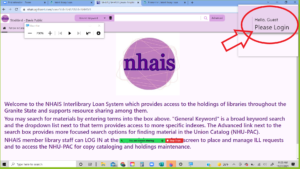
1. Find Login at the top right of the screen
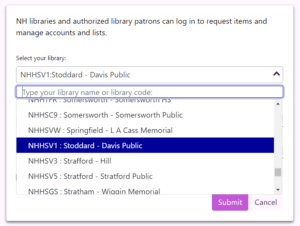
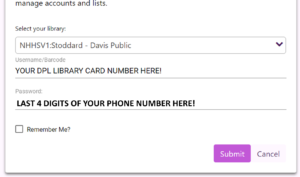
2. Select "Stoddard - Davis Public Library" from the dropdown and use your library card number and the last 4 digits of your phone as your password.
3. Search for something (preferably by title or author) with the search box at the top of your screen and click the "Request" finger!
You may have to click the Title in blue before the button will appear!
Do you need to just see it? Watch
this video
!
Social Media Auto Publish
Powered By :
XYZScripts.com